Saturday, December 20, 2025

πŸ’°Data Analyst Salary in India 2025 (Fresher vs Experienced) | India vs USA

In an increasingly data-driven world, the role of a Data Analyst has become one of the most crucial and sought-after professional paths. This detailed guide explores the salary landscape across India and the USA in 2025, highlighting differences between freshers and experienced professionals, industry variations (tech vs finance vs consulting), remote vs on-site work, and the fastest paths to high salary.

Data Analyst Salary in India and USA 2025 infographic showing fresher vs experienced pay, tech finance consulting salaries, remote vs on-site jobs by Datahark.in


πŸ“Œ Table of Contents

  1. Overview – Why Data Analytics in 2025
  2. Data Analyst Salary in India 2025

    1. Fresher vs Experienced Pay
    2. Salary by City
  3. Data Analyst Salary in USA 2025

     
    1. Fresher vs Experienced Pay
    2. Cost of Living Adjustment
  4. Industry Breakdown – Tech vs Finance vs Consulting

    1. Tech (Product & IT Services)
    2. Finance & Banking
    3. Consulting & Analytics Firms
  5. Remote vs On-Site Roles – Salary & Growth
  6. Fastest Tools for Getting Hired in 2025
  7. Exact Learning Roadmap for Maximum Salary
  8. FAQs
  9. Conclusion

1. Overview – Why Data Analytics in 2025

Data Analysts are the backbone of business decision-making, transforming raw data into actionable insights. According to industry reports, the demand for data analytics talent continues growing both in India and globally β€” driven by digital transformation across sectors like e-commerce, fintech, healthcare, telecom, and consulting.

The field offers excellent pay progression, especially for professionals with strong technical skills (SQL, Excel, Python) and visualization tools (Power BI, Tableau). Mastery of these tools often correlates with higher hiring frequency and better offers.


2. Data Analyst Salary in India 2025

πŸ“Š Salary Ranges by Experience

Experience LevelAverage Annual Salary (β‚Ή LPA)
Fresher (0–2 yrs)β‚Ή3.5 – β‚Ή5.0 LPA 
Mid-Level (2–5 yrs)β‚Ή6 – β‚Ή10 LPA 
Senior (5–10 yrs)β‚Ή12 – β‚Ή18 LPA 
Lead / Manager (10+ yrs)β‚Ή18 – β‚Ή30+ LPA 

Key Highlights:

  • Freshers typically start at around β‚Ή3.5–5 LPA if they have practical skills and internships. 
  • With 3–5 years, analysts often earn between β‚Ή6–10 LPA
  • Senior and leadership roles in major metro cities and large tech firms can exceed β‚Ή15–20 LPA

πŸ“ Salary By City

India’s metros like Bengaluru, Hyderabad, Mumbai, Pune, and Delhi NCR generally offer the highest pay bands due to concentration of tech and analytics centers, while Tier-2 cities offer slightly lower but rapidly rising packages.


3. Data Analyst Salary in USA 2025

πŸ‡ΊπŸ‡Έ Salary by Experience (USD)

Experience LevelAverage Salary (USD/yr)
Fresher (0–2 yrs)$55,000 – $60,000 
Mid-Level (2–5 yrs)$70,000 – $85,000 
Senior (5–10 yrs)$95,000 – $120,000 

🌎 Compared to India, salaries in the USA are significantly higher due to differences in cost of living, market maturity, and demand for specialization. However, remote roles and global hiring trends are narrowing the gap for skilled Indian professionals working for US firms.

πŸ’‘ Cost of Living Adjustment

Even though absolute salaries are higher in the USA, consider that living expenses, healthcare, and taxes are also much higher. Many Indian analysts choose remote US-paid roles to benefit from high salary while residing in India.


4. Industry Breakdown – Tech vs Finance vs Consulting

πŸ’» Tech (IT & Product Companies)

Tech companies β€” especially product firms and large IT service providers β€” are biggest hirers for data analysts. Product tech roles often pay better due to global client exposure and complex data pipelines.

  • Freshers often land roles with solid entry packages.
  • Mid and senior analysts can cross β‚Ή12–20 LPA in India and $80k–$120k in the USA.
  • Big tech and FAANG-like companies often include bonuses and stock options, greatly increasing total compensation.

🏦 Finance & Banking

Finance sectors value data analysts for forecasting, risk analysis, and customer insights.

  • Often emphasize strong statistical analysis and Excel/Python skills.
  • Pay range is competitive, often on par or slightly above IT services in major hubs.

πŸ“Š Consulting & Analytics Firms

Consulting firms often offer varied exposure and relatively higher pay due to billable projects and client engagements.

  • Senior analysts and consultants may earn premiums over general corporate roles.

5. Remote vs On-Site Roles – Salary & Growth

🌐 Remote Data Analyst Roles

  • Remote analysts working for international companies β€” especially US/European firms β€” can earn above local benchmarks.
  • In some cases, remote contractors easily exceed β‚Ή15–20 LPA in India while working for US clients.

🏒 On-Site Data Analyst Roles

  • On-site roles often include additional perks like relocation benefits, stock options, and office allowances.
  • Roles in major business hubs (Bengaluru, Hyderabad, NYC, SF) remain highly competitive.

  • Tip: Hybrid and fully remote roles continue to rise, especially in analytics, unlocking international pay without relocation.


6. Fastest Tools for Getting Hired in 2025

Sales recruiters and HR analytics teams tend to hire faster for candidates proficient in:

βœ” SQL & Excel – Fundamental for querying and reporting
βœ” Python / R – For analytics and modeling
βœ” Visualization Tools:

  • Power BI β€” Widely used across enterprises
  • Tableau β€” Often favored for advanced visualization

βœ” Cloud Analytics: AWS, Azure, GCP

Among these, candidates with SQL + visualization + real portfolio projects tend to get fast interview callbacks and offers. (internal link: Power BI vs Tableau guide)


7. Exact Learning Roadmap for Maximum Salary

If your goal is highest salary + fastest hiring, follow this roadmap:

✨ Beginner (0–6 months)

  • Excel (Advanced) – Data cleaning & pivot tables
  • SQL – Fundamental querying
  • Python Basics – Pandas, NumPy
  • BI Tools Intro – Power BI / Tableau fundamentals

πŸ”₯ Intermediate (6–12 months)

  • Data Visualization – Dashboards & storytelling
  • Python for Analytics – Advanced libraries
  • Projects + Portfolio – GitHub + public dashboards

πŸš€ Advanced (12–24 months)

  • Cloud Data Platforms – AWS/Azure analytics
  • ML Basics – Predictive modeling
  • Certifications:

    • Google Data Analytics
    • Microsoft/Power BI
    • Tableau Desktop Specialist


8. Frequently Asked Questions (FAQ)

Q1: What is the average fresher data analyst salary in India in 2025?
A: Freshers can expect around β‚Ή3.5–5 LPA, depending on skills and projects. 

Q2: How much can a senior data analyst earn in the USA?
A: Senior analysts typically earn between $95,000 and $120,000 annually.

Q3: Which industries pay the highest?
A: Tech and finance generally pay top packages, with consulting close behind.

Q4: Are remote analytics roles better paid?
A: Remote roles for US companies often pay higher than on-site India packages.

Q5: What tools should I learn first?
A: Start with SQL, Excel, Power BI/Tableau, then expand to Python and cloud analytics.


9. Conclusion

The data analytics career continues to be one of the most rewarding paths in 2025 β€” both in India and the USA. Freshers start strong with β‚Ή3.5–5 LPA in India and ~$55k in the US, while experienced analysts can command β‚Ή15–30 LPA or over $120k with the right skills and industry focus.

Focus on in-demand tools, real projects, and certifications to accelerate your hiring potential and command top salaries across sectors like tech, finance, and consulting.

Visit: www.Datahark.in

Other Posts (Worth reading): 

πŸ“Š Power BI Salary in India & USA 2025 β€” Ultimate BI Career Guide (Tableau vs Power BI)

πŸ“Š Descriptive Statistics Explained Simply | Mean, Median & Std

🧹 Data Cleaning & Transformation Using Power Query in Power

πŸ”— Connecting to Data Sources in Power BI (Excel, SQL, Web & APIs)

πŸ“Š Types of Data & Data Collection Methods in Data Science (Part 2)


Data Analyst Salary India 2025, Data Analyst Salary USA, Fresher Data Analyst Salary India, Experienced Data Analyst Salary, Data Analytics Salary, Remote Data Analyst Jobs, Tech Finance Consulting Salary, Data Analyst Career 2025, Power BI vs Tableau Salary, SQL Data Analyst Salary

Labels: , , , , , , , , , , , ,

πŸ“Š Power BI Salary in India & USA 2025 β€” Ultimate BI Career Guide (Tableau vs Power BI)

Power BI Salary in India & USA 2025 – Tableau vs Power BI (Complete Salary Guide)

Updated for 2025: Business Intelligence (BI) tools like Power BI and Tableau are among the highest-paying analytics skills globally. This guide breaks down Power BI salary in India & USA 2025, compares Tableau vs Power BI pay, analyzes industries, remote vs on-site jobs, hiring speed, and gives a proven learning roadmap to reach maximum salary.

ower BI Salary in India and USA 2025 comparison infographic by Datahark.in


πŸ“Œ Table of Contents

  • Introduction
  • Power BI Salary in India 2025
  • Power BI Salary in USA 2025
  • Tableau Salary in India & USA 2025
  • Industry Breakdown β€” Tech vs Finance vs Consulting
  • Remote vs On-Site Salaries 2025
  • Which Tool Gets You Hired Faster in 2025?
  • Power BI & Tableau Learning Roadmap (For Max Salary)
  • FAQs
  • Conclusion

🧠 Introduction

In 2025, Business Intelligence (BI) tools like Power BI and Tableau are among the most sought-after skills by data-driven companies. Businesses across India and the USA need BI professionals to transform huge volumes of raw data into insights that drive decisions. Salaries vary widely based on country, experience, industry, and remote vs on-site work.

This guide gives you everything you need: salary comparisons, hiring trends, industry pay differences, and the best way to skill up for maximum earning potential.

πŸ’° Power BI Salary in India 2025

Experience Level Annual Salary (β‚Ή LPA)
Entry Level (0–2 years) β‚Ή3.5 – β‚Ή8 LPA
Mid-Level (3–5 years) β‚Ή10 – β‚Ή15 LPA
Senior / Lead (6–9 years) β‚Ή18 – β‚Ή25 LPA
BI Architect / Manager β‚Ή30 LPA+

In India, Power BI is widely adopted by IT services, product companies, startups, and consulting firms. Demand exceeds supply, making Power BI one of the fastest-growing analytics careers in 2025.

πŸ‡ΊπŸ‡Έ Power BI Salary in USA 2025

Role Salary (USD/year)
Power BI Developer $90,000 – $120,000
Senior BI Analyst $130,000 – $150,000
BI Consultant / Manager $140,000 – $160,000+

In the US market, Power BI salaries are driven by strong demand in enterprise analytics, cloud reporting, and Microsoft ecosystem integrations.

πŸ“Š Tableau Salary in India & USA 2025

Country Tableau Salary Range
India β‚Ή4 – β‚Ή16 LPA
USA $96,000 – $150,000+

Tableau professionals often earn slightly higher salaries in finance, healthcare, and advanced analytics roles, especially in the US.

🏒 Industry Breakdown β€” Tech vs Finance vs Consulting

πŸ’» Tech Industry (IT & Product Firms)

  • Power BI & Tableau roles in tech usually require strong data modeling, integration skills, and dashboard automation.
  • Tech companies often pay higher base salaries with performance bonuses.
  • USA tech roles can push totals well past six figures with experience.

🏦 Finance & Banking

  • Finance companies value deep analytical skills and reporting accuracy.
  • Tableau sometimes favored for complex visualization in risk, forecasting & finance analytics.
  • Salaries in this sector can command premium pay especially in the US. 

πŸ“Š Consulting Firms

  • BI consultants (both Power BI & Tableau) often earn higher pay due to billable expertise and client engagements.
  • Consulting roles may pay more if travel and project skills are required β€” especially in multinational firms. 

🌍 Remote vs On-Site Salaries 2025 and BI Jobs

In 2025, both remote and on-site BI jobs are growing, yet compensation trends vary:

πŸ”Ή Remote Roles

  • Often pay slightly less base salary vs big-city on-site roles but give location flexibility.
  • Remote BI developers can earn between $80k – $110k in the USA if experienced. 

πŸ”Ή On-Site Roles

  • Typically within large enterprises or finance hubs pay more, especially in major metros.
  • Senior BI on-site roles in finance or tech can exceed $150k+.

In India, remote roles often pay similar to on-site, with compensation tied more to skill level than physical location.

πŸš€ Which Tool Gets Hired Faster in 2025?

🧠 Adoption & Demand

πŸ“Œ Power BI is consistently one of the most demanded BI tools globally thanks to easy MS ecosystem integration, strong enterprise usage, and lower cost for businesses. 

πŸ“Œ Tableau still holds strong presence, particularly in enterprise analytics, finance, and roles where advanced visualization is critical.

πŸ‘‰ According to hiring insights, Power BI-certified candidates often see recruiter outreach faster, especially if they pair certification with portfolio dashboards. 

πŸ“Š Verdict:

  • For most BI jobs and volume of opportunities β†’ Power BI
  • For higher specialist visualization roles β†’ Tableau

🧠 Learning Roadmap for Maximum Salary

πŸ§‘β€πŸŽ“ Power BI & Tableau Learning Roadmap (Max Salary)


Skill TierSkillset to Master
BeginnerPower BI basics, Excel, SQL fundamentals
IntermediateDAX, Power Query, data modeling
AdvancedAzure/Data Lakes, automation (Power Automate), architecture
ProfessionalBI strategy, leadership/project design

πŸ“ˆ Recommended Certification Process

  1. Microsoft Power BI Data Analyst (PL-300) – foundational for high-pay BI analyst roles.
  2. Advanced DAX & Data Modeling Certified Courses
  3. Build portfolio with real dashboards (Tableau Public / GitHub)

πŸ‘‰ Learn tools + business storytelling skills for maximum salary and competitiveness.

❓ Frequently Asked Questions (FAQ)

Is Power BI a good career in 2025?

Yes. Power BI remains one of the highest-demand BI tools globally.

Which pays more: Power BI or Tableau?

Tableau pays slightly higher in niche roles, but Power BI has more job opportunities.

Do certifications increase salary?

Yes. Microsoft PL-300 certification significantly improves hiring chances.

Can freshers learn Power BI?

Absolutely. Power BI is beginner-friendly and highly suitable for freshers.


🏁 Conclusion

In 2025, BI careers powered by Power BI and Tableau present robust salary potentials in India and the USA. Power BI often wins in job volume and faster hiring, while Tableau can yield higher pay in niche visualization roles. To maximize salary:

βœ” Start with Power BI foundation + SQL + dashboard portfolio
βœ” Add Tableau skills for specialist, finance & consulting job paths
βœ” Get certified + apply for remote roles for flexibility and growth

Your BI career roadmap in 2025 is clearer than ever β€” skill up, specialize, and build real projects.

Visit: www.Datahark.in

What is Power BI? A Complete Guide to Microsoft’s Business Intelligence Tool

Getting Started with Power BI: A Beginner’s Guide to Data Visualization
Data Preparation in Power BI: Power Query Editor, Data Transformation & DAX Guide
Power BI salary India 2025, Tableau salary India USA, BI salaries 2025, Power BI vs Tableau jobs, BI jobs remote vs on site, Power BI career roadmap

Labels: , , , , , , , , ,

Sunday, May 10, 2020

Sorting and Top N Analysis in Tableau

Sorting in Tableau - 

Lets Understand sorting in Tableau by Creating a simple Example -

1. I have already extracted data of few customer, Now the first step is go to your  worksheet and Choose a Field like I choose Customer Name from dimension and drop in Column Shelve
2. Add Sum(Sales) in Row Shelve.
3. Click on Customer Name (Drop down)in Column Shelve and Choose Sort
Sorting in Tableau Step 1


4. Now in Sort Popup Window Choose the Sort by option, like Data Source order, Alphabetic, Field, Manual or Nested. I want my Visualization sorted based on Sum(Sales), so I choose Field Option.
5. Now Choose type of sort you want like Ascending or Descending radio button as per your requirement.
6. Now Choose Field Name and the aggregate Function, like I want sorting based on Sum of sales amount so Choose Sales in Field Name and Sum in Aggregation.

Sorting in Tableau Step 2
You can also do sorting by Clicking on sort button available near the Axis Caption Name (See small little video available below)
Sorting in Tableau Step 3


Top N Analysis - 

Suppose we have to perform Analysis based on top 10 cities based on Profit. so here are few steps to do that - 
We need to create a report of top 10 Cities based on Profit and we also want to showcase Sales of those cities in Graph

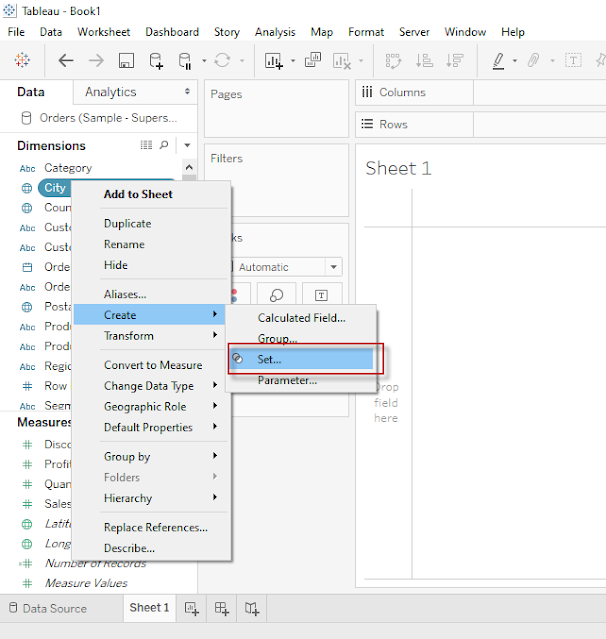
1. Create a Set of Top 10 Cities based on Profit see in Below images  - 

Top N Analysis step 1


2. Give any Name for your newly created Set, and select Top 10 in By Field Section from Create Set pop - 

Top N Analysis step 2

3. Add Newly created Field from sets to Column Shelve and add Sales and Profit in Row Shelve 

4. Click on Drop down for Sum(Profit) as shown in below image and Choose Dual Axis to create a Dual Axis Chart
  
Top N Analysis step 3

5. See Below Analysis created by above step, it has Sales and Profit for top 10 Cities(Who has highest profit)

Top N Analysis step 4

Labels: , , ,

Saturday, May 9, 2020

Different Type of Filters in Tableau

Filters are generally used to restrict the number of records available in data source. In other words Filters are use to create subset of Data. In Tableau there are Filters available at various level for different purposes.Β 

Given below are the Filter types available in Tableau

  • Extract Filters
  • Data Source Filters
  • Context Filters
  • Dimensions Filters
  • Measure Filters


Extract Filters :

When we use extract data instead of Live data from data source then we can apply filters at Extract level.Β 

We already know how to Make a connection to data source and what is the difference between live and Extract dataΒ in Tableau. Now we are going to learn Extract filters through simple steps, see below images and description -Β 

Click here to Read more Β»

Labels: , , ,

Thursday, May 7, 2020

Learn Creating Sets in Tableau

What is Set

Set is a well defined collection of Values.

In Tableau, Set is a Custom Field which we can create to hold some or all Values of a Column based on a Particular Condition.

We Can create Set out of Variable by following methods
  • Selecting data from List
  • Based on a condition (It includes Condition based on another Field or it could be a Range of Values, or we can also create Formula for that)
  • By Selecting Top/Bottom Number of values.
We can create set of Dimensions only, but condition can be based on Measures as well.

For Example-Β  We want to select/Create a set of those Cities who has sales (Measure) more than 50Lac or we want to create set of Top 10 Cities based on Profit.

How to create Set in Tableau -Β 

Click here to Read more Β»

Labels: , , ,

Sunday, May 3, 2020

Types of Chart available in Show Me Pane - Tableau

Tableau is a very advance Data Analysis and Visualization tool, It makes the data analysis very easy through so many techniques without writing any code. One of the very advance feature of Tableau is "Show Me". In "Show Me" we can choose and apply required view on existing data in worksheet.

Those view can be any like Pie Chart, Heat Map, Globe Map, Horizontal/stacked/Side-by-side Bars, Tree Map, Circle View, Area Chart, Gant Chart and many more.

Click here to Read more Β»

Labels: , , ,

Creating First Visualization in Tableau

Hello Folks - Now we are able to understand basic Concepts of Tableau i.e. What is Tableau and how to start working on this. we know the Component of Tableau Desktop, Now its time to Learn how to create Visualization in Tableau Desktop, also i am going to show how to publish your work on Tableau Public.

When we install Tableau Desktop, it also provide Sample Data of a Superstore for learning purpose, we are going to use that data for this tutorial.

Click here to learn How to connect to a Data source in TableauΒ then proceed further for Visualization.

After connecting to Sample Data and open Orders in Data Pane, Click on Extract button to Extract
Click here to Read more Β»

Labels: , , ,

Sunday, April 26, 2020

Dimensions & Measures in Tableau


There are two types of Variables in Tableau - Every variable is categorized in tableau automatically either under dimension or Measures

Let's understand the difference between Dimension and Measure in detail -

Dimensions -

Any Variable with qualitative/Categorical information will be treated as dimension by default in Tableau.
It produce the header when we add this variable to Row Column shelve in Worksheet.

The Actual Definition of dimension is - A dimension is a field that can be considered an independent variable.

To understand it simply any Value Containing any text, date, Geographical location, Boolean value etc are considered as Dimension.

Click here to Read more Β»

Labels: , , ,

How to Edit Datatype of a Column/Variable in Tableau

Tableau is very smart software, it automatically detect and assign datatype to Variables while making connection with data source.
However, it also provide facility to Change datatype of variable, sometime we need data to be in a particular datatype so here are some stages in which we change datatype of existing variable-

From Datasource Page

First option to change the datatype of a variable is from Datasource Pane, Click on Datatype icon of a variable in data source pane and choose datatype from dropdown list, this is how we can change the datatype from datasource pane. See below screenshot-
datatype from datasource pane

Click here to Read more Β»

Labels: , , ,

Saturday, April 25, 2020

Types of Variable in Tableau - Datatypes

There are seven primary Datatypes Available in Tableau.

1. String values
2. Number (Integer) values
3. Date values
4. Date & Time values
5. Boolean values
6. Geographic values
7. Cluster or mixed values

When we load our Data or Connect tableau with Data source then Tableau is Smart enough to detect the type of data automatically, Each column/variable is assigned with a different symbol of distinct data type and we can identify the datatype easily.
Tableau also provide the ability to change the datatype from the dropdown in Datapane as shown Below -Β 
Click here to Read more Β»

Labels: , , ,

Sunday, April 19, 2020

Difference Between Live Connection and Extract Data

Live:Β 

  • This allows real time data for analysis from available data source.Β 
  • It is also known as real time Extract A live connection is a query that underlying data in the data source/database.Β 
  • When we refresh the visualisation that gives the latest results.Β 
  • Data is not copied to Tableau Server for preprocessing.
Click here to Read more Β»

Labels: , , ,

Connect to a Data Source in Tableau


Here we will see how to connect with a Data source Like MS Excel:

When we install Tableau Desktop it provides a Sample Data of a Superstore by default to practice and Learn Tableau:
That is available in your tableau folder on following location:
C:\Program Files\Tableau\Tableau 2020.1\defaults\Datasources\Sample - Superstore.xlsx

We will practice all the exercise and Learn through this data in this and upcoming posts:

Lets follow the below points to connect to the data source to the Tableau
Click here to Read more Β»

Labels: , , ,

Component of Tableau Desktop

See Below screenshot and find the different Component when you open Tableau for the first time:

Tableau Desktop
First Screen
Click here to Read more Β»

Labels: , , ,

What is Tableau, How to start working on Tableau


What is Tableau?Β 

Tableau is Most Powerful and most Trending tool now a days for data Visualization, Which helps in Business Intelligence Process to understand the data in Simpler way and to Make Quick Business Decisions to grow Business and Performance.
Click here to Read more Β»

Labels: , , ,